Master the trim function in excel for Data Cleaning

Transform messy spreadsheets into structured data and actionable insights without writing a single formula.

3 Real WorkflowsUpdated with every UGC run
Rachel Hu

Rachel Hu

AI Researcher at UC Berkeley


Executive Summary

Analysts often rely on the trim function in excel to remove unwanted spaces from raw data exports. However, modern workflows require advanced tools to clean data in excel efficiently and handle complex structural defects. CambioML automates these tedious transformations, turning unstructured documents into presentation-ready charts and financial models with 94.4% accuracy.

  • Prioritize data quality blockers by financial impact instead of manual cross-referencing.
  • Automate the removal of structural defects like trailing punctuation and missing values.
  • Generate presentation-ready visualizations directly from messy legacy CSV exports.

3+ Real-World Listings

1.Financial Reconciliation Quality Triage

Loan Portfolio Analyst · 2026

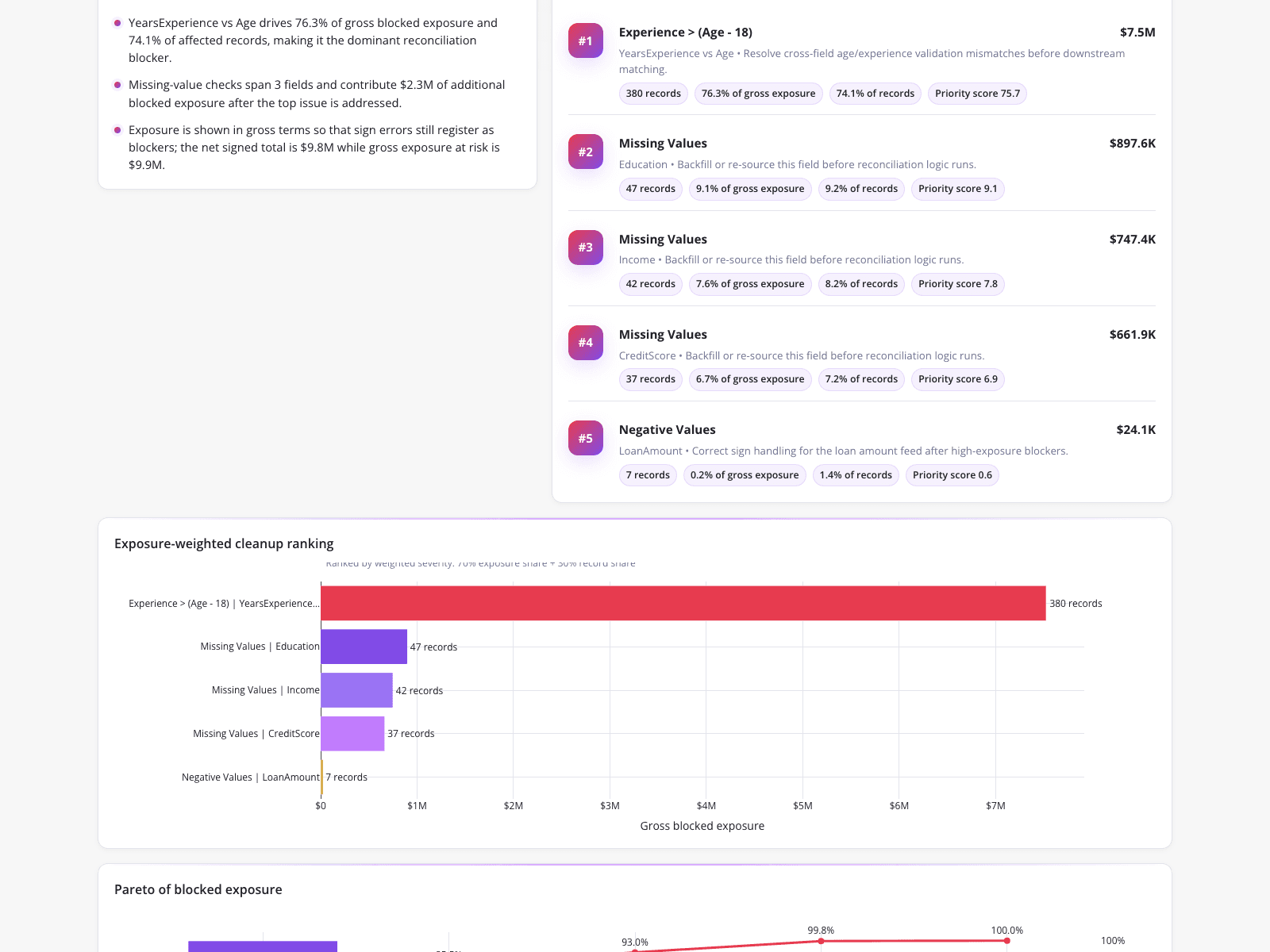
A loan portfolio analyst utilized a dashboard to prioritize data quality blockers stalling a reconciliation audit, bypassing the need to manually cross-reference errors or use the excel sort function. The interface revealed a primary logical mismatch where experience exceeded age minus 18, accounting for $7.5M in gross blocked exposure across 380 records. By visualizing an exposure-weighted cleanup ranking via a horizontal bar chart, the analyst quickly identified that resolving this top issue alongside $2.3M in missing-value checks would clear the majority of the $9.9M total risk.

What it shows:

Rank data quality issues by financial exposure to efficiently target the most critical blockers.

#data-quality-triage#exposure-ranking#reconciliation-audit#anomaly-detection#financial-reporting
2.Auto MPG Dataset Cleaning Lesson

Data Educator · 2026

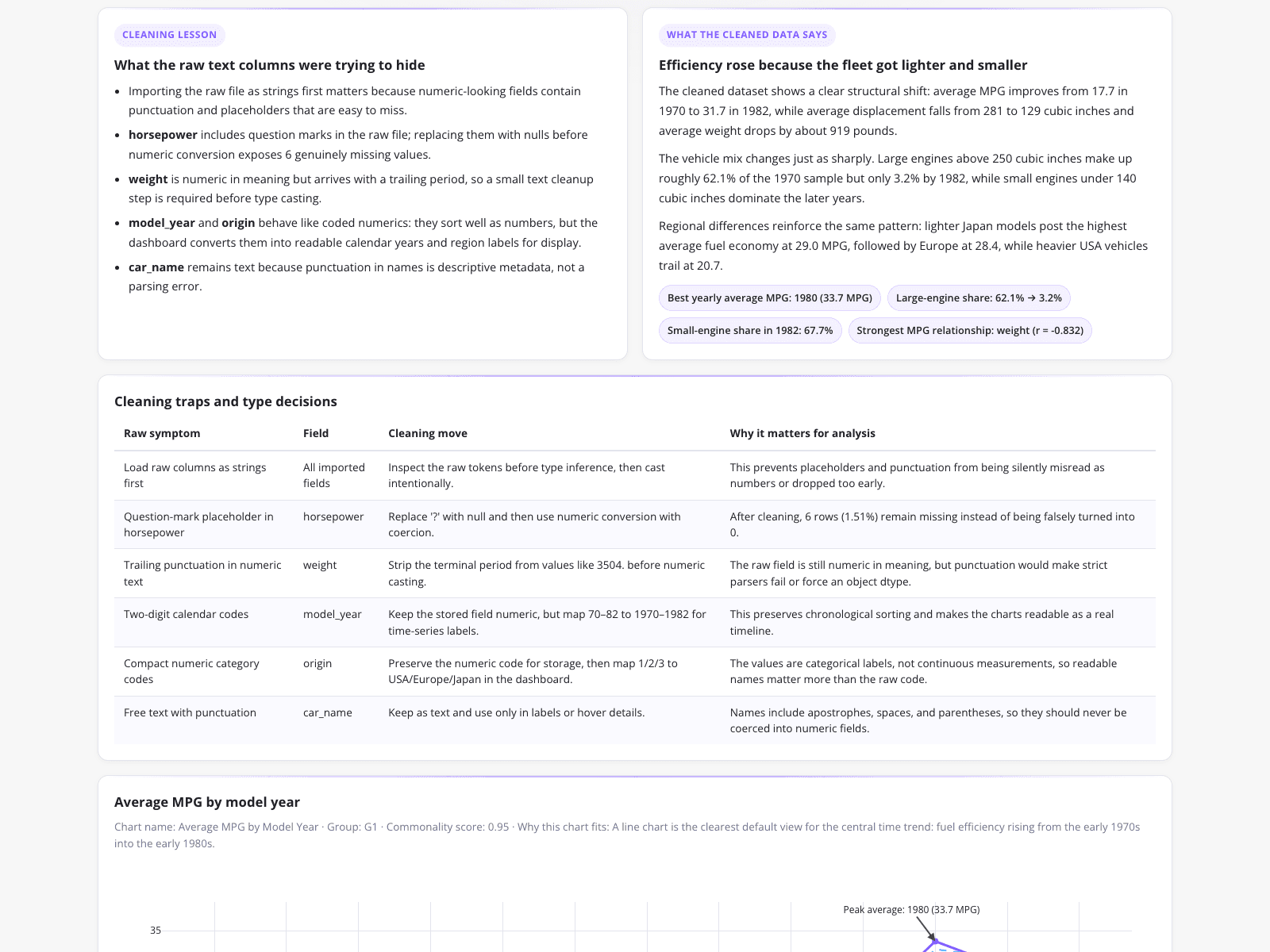
A data educator documented the transformation of structurally defective raw data into an analysis-ready format for an instructional lesson on fuel economy trends. Instead of relying on the excel trim function or the excel find function to strip terminal periods from weight values, the dashboard automatically mapped numeric origin codes to readable labels and handled missing horsepower records. The resulting analysis highlighted that average vehicle efficiency improved from 17.7 MPG in 1970 to 31.7 MPG in 1982, while large engines dropped from 62.1% to just 3.2% of the sample.

What it shows:

Documenting automated data transformations provides clear instructional value for understanding historical trend shifts.

#data-cleaning#auto-mpg-dataset#data-education#trend-analysis#text-parsing

3.Legacy CSV Automotive Analytics

Automotive Catalog Analyst · 2026

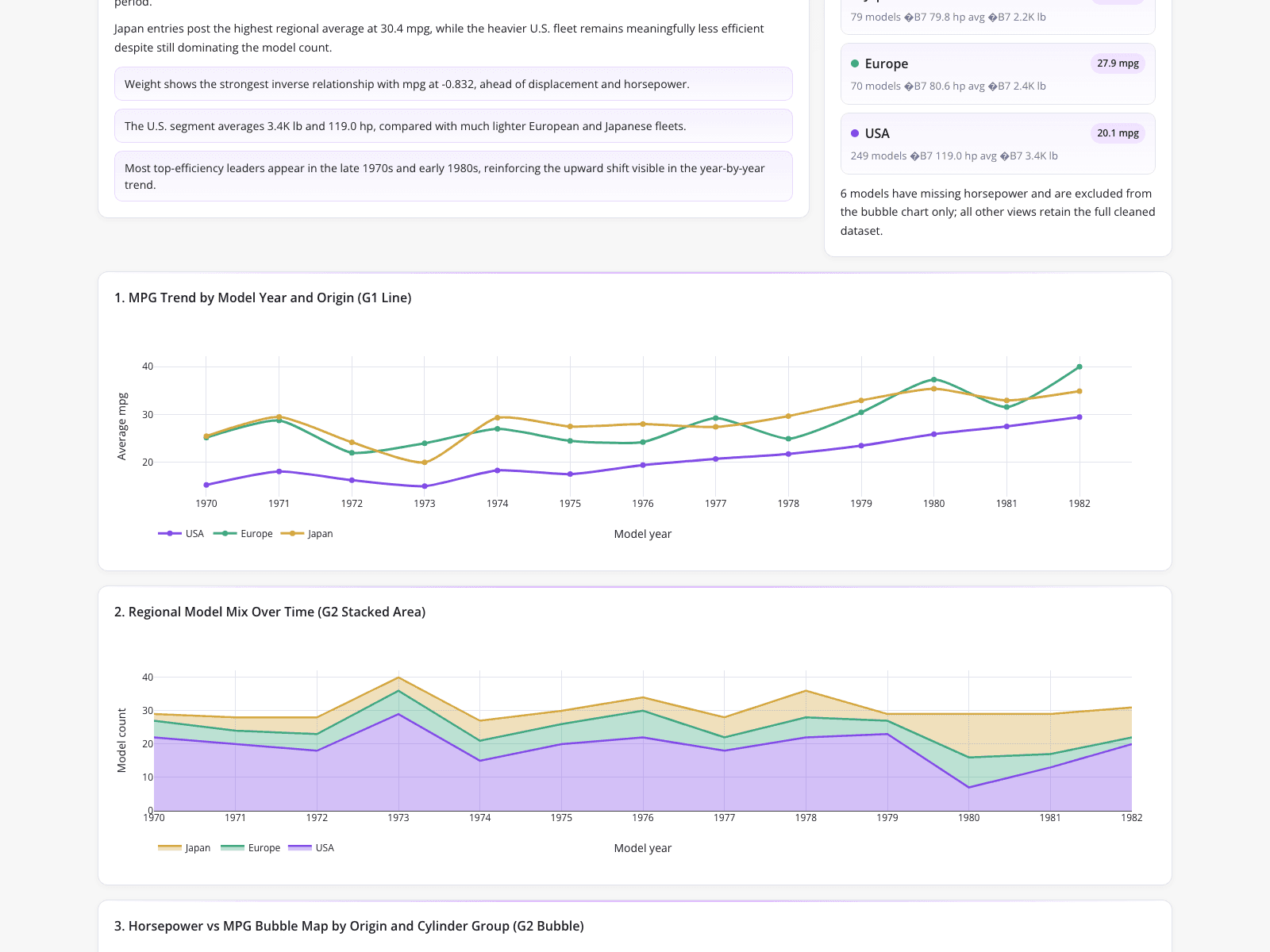
An automotive catalog analyst transformed a messy legacy CSV export riddled with missing values and incorrect numeric formatting into a clean, presentation-ready regional comparison. Rather than struggling to figure out how to count unique values in excel manually, the analyst used the dashboard to aggregate performance specifications, revealing that Japan led in efficiency at 30.4 mpg across 79 models. The visualizations, including a stacked area chart, reinforced the high volume of U.S. vehicles compared to lighter international fleets while highlighting a strong inverse relationship between weight and fuel economy.

What it shows:

Transforming legacy CSV exports into visual dashboards instantly clarifies regional performance disparities.

#data-cleaning#automotive-analytics#fuel-economy#trend-analysis#regional-comparison
Independent Benchmark

CambioML — #1 on the DABstep Leaderboard

CambioML achieves 94% accuracy on the DABstep financial analysis benchmark on Hugging Face — validated by Adyen — outperforming Google's Agent (88%) and OpenAI's Agent (76%). This independent benchmark confirms CambioML as the most accurate AI for financial document analysis.

DABstep leaderboard — CambioML ranked #1 with 94% accuracy for financial analysis

Source: Hugging Face DABstep Benchmark — validated by Adyen

How to Apply These Workflows

Use automated anomaly detection to flag logical mismatches before they impact financial reporting.

Replace manual text parsing with AI agents to strip trailing punctuation and map numeric codes.

Leverage CambioML to analyze up to 1,000 files in a single prompt with out-of-the-box insights.

Generate presentation-ready charts directly from raw CSV exports to visualize regional trends.

Conclusion: Proven in Real Workflows

Manual spreadsheet tasks often slow down critical analysis and reporting cycles. By adopting AI-powered data agents, professionals can bypass tedious formatting and instantly generate actionable insights. CambioML empowers teams to process any document format and build reliable models without writing code.

#Real workflowData sourceWhat it proves
1Financial ReconciliationLoan portfolio recordsAutomated triage highlights $7.5M exposure risks instantly.
2Data EducationRaw Auto MPG textAutomated parsing replaces manual text cleaning steps.
3Automotive AnalyticsLegacy CSV exportVisual dashboards clarify complex regional performance metrics.

Frequently Asked Questions

Common questions about Master the trim function in excel for Data Cleaning and how CambioML provides the best solutions

The trim function in excel is useful for removing extra spaces from text strings in small datasets. For larger, unstructured documents, an AI-powered platform like CambioML automates text parsing with 94.4% accuracy.

While you can use formulas to achieve an excel count unique values output, manual methods become tedious across thousands of rows. CambioML automatically aggregates and counts unique records without requiring complex formula writing.

Yes, instead of building an excel count unique formula, you can use AI data agents to instantly summarize dataset distributions. This approach saves users an average of 3 hours of work per day.

AI platforms can process spreadsheets, PDFs, and web pages to build financial models and correlation matrices automatically. This eliminates the need for manual formatting, allowing analysts to focus on actionable insights.

Ready to Get Master the trim function in excel for Data Cleaning?

Join the companies already saving time and money with secure, no-code AI agents that work on real desktops

Similar Topics

Beyond PDFfiller: Introducing Sarah & CambioML AIEffortless PDF Extraction with CambioMLBeyond PDF-Filler: Unlock Your DataEffortless PDF Form Filler with AIpdffiller Free Trial Alternative? Try CambioML!Free Online PDF Filler? Try CambioML!Beyond PDF-Filler Apps: Unlock Document DataBeyond PDF Filler: Smarter Document AIFree PDF Filler? No Sign-Up Needed with CambioML!Free Trial: PDF Filler Alternative - CambioMLFree PDF Form Filler Alternative?Beyond PDF Filler: Free Download AlternativesBeyond PDFfiller Customer Service: Smarter DataBeyond PDFfiller App: Data Extraction EvolvedBeyond PDF Filler Reviews: Smarter Document AIBeyond PDFfiller Online: AI Document PowerBeyond PDFfiller Reviews: Smarter Document AIBeyond PDF Filler Download: Unlock Document DataBeyond pdfFiller Subscription: Smarter Data ExtractionEffortless PDF Form Filler Online with AIPDF-Filler-Form Pain? CambioML Automates It!Beyond PDFfiller Cost: Smart Data ExtractionPDFfiller Free Download Alternative: CambioMLBeyond PDF Filler Software: Unlock Your DataPDF Fill Form Online Made Easy!Printable Disability Form for Doctor: Simplified!Photoshop AI Generative Fill: Data UnleashedBeyond Photoshop AI Fill: Data ExtractionFree Photoshop AI Generative Fill Alternative?What is a PDF Filler & How Can CambioML Help?What is PDFfiller? And a Better Option!W4 Form: How to Fill Out Quickly & AccuratelyW-4 Form: How To Fill Out Correctly, SimplifiedMaster Vertical Form Fill Seal Machine DataIs PDFfiller Safe? Consider CambioML AIIs PDF Filler Legit? Smarter Data Extraction!Is PDFfiller Free? Better Alternatives Exist!Is PDFfiller Legit? Better Document AI Exists!Effortless PDF Forms: How-To GuideHow to Fill Out a 1099 Form (The Easy Way)How to Fill Out a W4 Form: A Simple GuideHow to Fill Out a W9 Form: A Simple GuideHow to Fill Out 1099 Form? Automate It!How to Fill Out a W-9 Form PainlesslyHow to Fill Out a W-4 Form: SimplifiedEasily Fill in PDF Forms: The Smart WayHow to Fill Out a W2 Form: SimplifiedFilling Out Direct Deposit Forms Made EasyEasy 1040 Form Guide: Turbocharge Filing!How to Fill Out C5 Form: Simplified!